Schema referenced by Map has been deleted. BizTalk Server group configuration is out of date
While doing a Development with Oracle Extracted Schemas my Visual Studio 2010 fired an below error when I tried to deploy my solution.Schema referenced by Map "mapOrders" has been deleted. The local, cached version of the BizTalk Server group configuration is out of date. You must refresh the BizTalk Server group configuration before making further changes.I tried1.refreshing the BizTalk Group - No Luck
2.Close Visual Studio and BizTalk Admin Console - No use
3.Restarted SQL Service - No Use
I still facing same error.
Finally I removed an Entry at BizTalk management Datbase and it worked.
First Check your BizTalk Object name in bt_mapSpec Table
Select * from bt_mapspec
Delete an entry from bt_mapSpec table.
Delete from bt_mapspec Where itemid=

2.Close Visual Studio and BizTalk Admin Console - No use
3.Restarted SQL Service - No Use
I still facing same error.
Finally I removed an Entry at BizTalk management Datbase and it worked.
First Check your BizTalk Object name in bt_mapSpec Table
Select * from bt_mapspec
Delete an entry from bt_mapSpec table.
Delete from bt_mapspec Where itemid=
Solution
I was able to narrow down the cause of the issue to a BizTalk map that I created that used the Microsoft.XLANGs.BaseType.Any schema type. Apparently, this DLL is in the GAC, but it actually isn’t added to the BizTalk Group as a BizTalk Assembly. This is what I’m assuming that the error is referring to by “schema referenced has been deleted”. Basically, it is unable to locate an assembly in the BizTalk Group that is used in a map.
If you receive the error and are at a point where you can’t refresh the applications list or undeploy/redeploy due to the error, I found that simply restarting the BizTalkServerApplication host instance allowed me to refresh the applications list.
Then, I added Microsoft.XLANGs.BaseTypes.dll as a BizTalk Assembly to BizTalk Application 1. This is done by right-clicking BizTalk Application 1 -> Add -> BizTalk Assemblies… -> and selecting %BTSINSTALLPATH%\Microsoft.XLANGs.BaseTypes.dll.
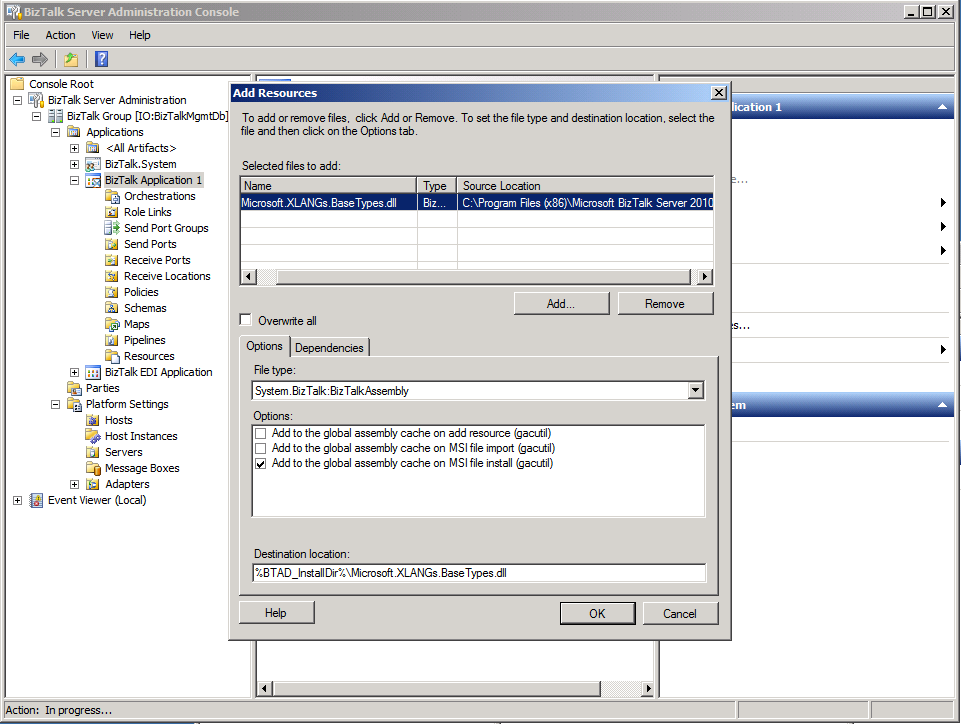
Voila! Everything appears to be well now. No manually editing data in database tables or BizTalk re installation required.
